Key takeaways
- A UWB RTLS datasheet accuracy figure — “10 cm,” or “30 cm, 99.9%” — is a best-case number measured in clean line-of-sight.
- What predicts real-world performance is accuracy stability: how consistently the system holds its accuracy over time and across the whole floor, including in non-line-of-sight and multipath.
- Two systems with the same headline number can behave completely differently once metal, reflections and moving tags are involved.
- The positioning method decides robustness: two-way ranging (time-of-flight) is inherently more stable than synchronisation-sensitive TDoA in messy environments.
The short version: a UWB RTLS datasheet accuracy number tells you how the system behaves on its best day, in ideal conditions. It does not tell you how it will perform in your building — on a floor full of metal racking, moving forklifts, reflective walls, and tags that keep slipping behind obstacles. The spec that actually predicts that is accuracy stability: not the smallest number a vendor can quote, but how consistently the system holds its accuracy over time and across the whole floor. Here’s the difference, why it matters, and how to test for it before you sign anything.
Accuracy, precision and stability are three different things
Most of the confusion around UWB RTLS accuracy comes from blurring three distinct ideas, here’s what they mean:
- Accuracy is how close a position reading is to the tag’s true location. A system is accurate if, on average, it points at the right spot.
- Precision is how closely repeated readings agree with each other. A precise system gives tightly grouped readings — even if that group is in the wrong place.
- Accuracy stability is whether the system stays accurate and precise over time and across the entire coverage area — through multipath, non-line-of-sight, interference, and movement.
A system can be any combination of the first two, and that’s the whole point.
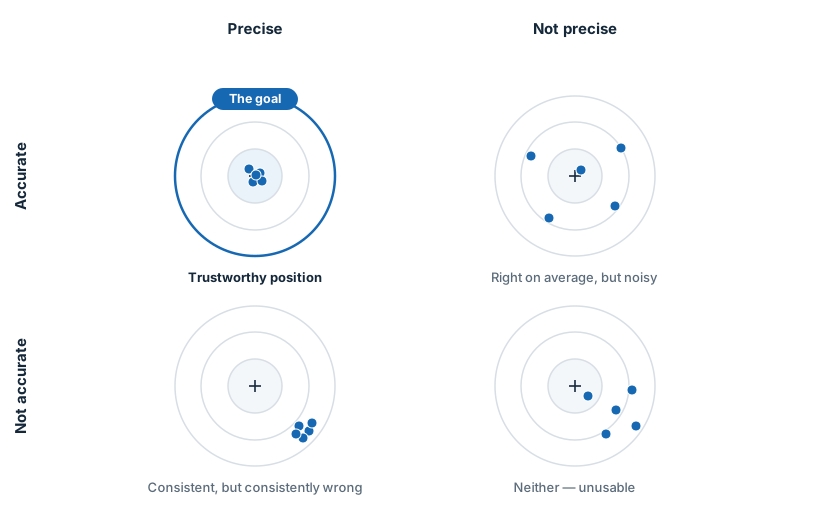
Accuracy vs precision in a UWB RTLS, shown as four targets: accurate and precise, accurate but noisy, precise but inaccurate, and neither Accurate and precise (top-left) is the only quadrant you can trust. A datasheet accuracy number describes the average — it says nothing about which quadrant you’ll actually live in once the system is installed.
Accuracy stability is the fourth question the picture can’t show, because it’s about time and space: does the system stay in that top-left target through a full shift, in every corner of the building, with the floor full of moving metal? That’s what decides whether a deployment succeeds.
Why one accuracy number doesn’t predict real-world performance
Consider two systems. Both advertise 30 cm accuracy, and both can defend it: 30 cm really is their typical reading. On the datasheet they are identical. In the building, they are nothing alike.
Here’s the distinction that matters. A location system is never perfectly steady — it wobbles a little around the true position all the time. A wobble of a few centimetres up to around half a metre is usually fine; most industrial and entertainment use cases tolerate it. What you can’t live with is the system occasionally throwing the position metres away from where the tag actually is.
See the chart below – two systems both advertise 30 cm, but one stays within a usable ~50 cm tolerance while the other spikes to around 2 m position error during non-line-of-sight events Both can honestly print “30 cm” — it’s their typical reading. Only one stays usable when a tag goes non-line-of-sight.

The blue system holds a tight band, comfortably inside a usable tolerance all the time. The orange one has the same typical reading — it sits inside the tolerance too, most of the time — then spikes to around 2 metres whenever a tag slips into non-line-of-sight or the signal bounces off something. Its typical number still reads “30 cm” on the datasheet; the problem lives in the tail, not the average. And those spikes are exactly the moments that break real applications:
- A geofence or zone triggers late or records a entry/exit where there was none, because the position jumped across a boundary.
- A process-automation step fires at the wrong station.
“99.9% of the time” sounds like near-perfection. Flip it around: that’s one bad reading in a thousand. At ten updates a second, that’s a wrong position roughly every 100 seconds — and you don’t get to choose when, or how far off it lands. A headline accuracy figure tells you nothing about the size of that tail, which is why a number with no stability figure beside it is a half-truth.
What degrades UWB accuracy in a real facility
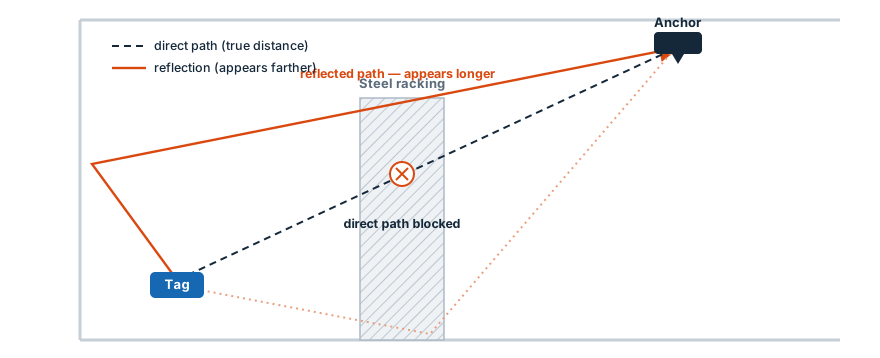
Accuracy degrades for physical reasons, and a good vendor can name them. The main culprit is multipath: the radio signal doesn’t only travel the direct path from tag to anchor, it also bounces off walls, floors, machinery, and racking, arriving by several longer routes.
Multipath and non-line-of-sight in UWB positioning: the direct path between tag and anchor is blocked by steel racking, while reflected signals arrive later and look like extra distance A reflected signal travels farther, so it looks like extra distance. How a system recognises and handles these late arrivals is what separates stable from unstable.
The hard cases, in increasing order of difficulty:
- Reflections and multipath — reflective surfaces are everywhere in industrial spaces that a good UWB system handles well.
- Non-line-of-sight (nLoS) — the direct path is blocked by a wall, a partition, or the asset itself; the system has to work from whatever gets through.
- Concrete and high-moisture or liquid-filled materials — always hard for any UWB system to penetrate.
No vendor can beat physics. The honest claim isn’t “unaffected by metal” — it’s “engineered to stay accurate in these conditions, and clear about where the limits are.” Accuracy in the worst cases depends on the materials and their thickness, and anyone who tells you otherwise hasn’t deployed their system in a real environment.
Why the positioning method decides accuracy stability
Stability is mostly determined by the measurement method underneath — the choice we covered in the UWB Active-Passive Protocol piece.
Time-difference-of-arrival (TDoA) scales to large tag counts and saves tag battery, but it leans on extremely tight time synchronisation across every anchor. When reflections and nLoS smear the arrival times, and when that synchronisation drifts, accuracy stability is the first thing to suffer — which is where a lot of those orange spikes come from.
Two-way ranging (TWR / time-of-flight) measures the round trip directly between tag and anchor, so it doesn’t depend on a facility-wide clock holding perfectly in step. It’s inherently more robust in the messy conditions above, because it can time the first-arriving signal and reject the late reflections rather than averaging them in.
That robustness is exactly why Eliko built its system on active-passive two-way ranging. It keeps two-way ranging’s precision and robustness — the stable band, not the spikes — while removing the scalability ceiling that standard TWR runs into, so you don’t have to trade stability for tag count.
What accuracy do you actually need? (Usually not 10 cm everywhere)
There’s a mistake we see often, and it’s an expensive one: a customer asks for the tightest possible accuracy — “10 cm, everywhere” — before anyone has asked what the location data is actually needed for. It feels like the safe choice. It rarely is.
Required accuracy is a property of the task, not the site — and most sites contain several tasks with very different needs:
- Guiding a person to a right machine or process areas need around 50 cm — sometimes a metre.
- Knowing how long a cart or person spent in a zone around a machine is often 30-40 cm.
- Tool tracking to make sure the right tool was picked up from the station – genuinely 10 cm.
Roll all of that into one blanket “10 cm everywhere” and you force the design into its worst case in every corner — including the hard non-line-of-sight and multipath spots where holding 10 cm takes a great deal of extra help. In practice that means building in heavy redundancy: far more anchors, denser coverage, more cabling, power and installation, and more to commission and maintain. You end up paying — in hardware and in project time — for precision you’ll never use.
Clients often reach for the maximum on instinct, not realising that, to a vendor, “10 cm everywhere” translates directly into an infrastructure-heavy network with redundancy layered in just to guarantee the number in the places it’s hardest to reach. The accuracy looks free on a requirements sheet. It isn’t — it’s anchors, cable, and commissioning time.
The better way round is to zone the facility by use case first, state the accuracy and update rate each zone actually needs, and let the network be designed to that. Right-sizing is where a good vendor earns their keep: we’ll ask about your use cases and push back on a blanket figure rather than just quoting to it.
It’s the same honest framing as the rest of this post: don’t chase the smallest number. Get a stable-enough number exactly where each task needs it — and don’t pay to put it where it doesn’t.
How to test RTLS accuracy stability before you buy
Don’t take anyone’s headline number, including ours, at face value. Here’s how to make a system show you its real behaviour in a pilot:
- Measure in real-world conditions. Put tags where they’ll actually live — behind racking, on the far side of a machine, on a moving vehicle.
- Use moving tags, not a tag on a bench. Static accuracy is the easy case and tells you little.
- Ask for the distribution, not the average. Look at the 95th and 99th percentile error, and the maximum. The outliers are the story.
- Record over time and across the whole floor. A system can be stable in one zone and fall apart in another; a single-spot demo hides that.
- Count the spikes and ask what caused each one. A vendor who can explain the failures understands their system. One who can’t, doesn’t.
If a vendor resists any of this and keeps pointing at the datasheet figure, that’s your answer.
Where Eliko stands
We lead with stability because it’s what our positioning method is built for. Eliko RTLS delivers reliable 30-50 cm accuracy, 10 cm in clear line-of-sight, and because it runs on robust active-passive two-way ranging rather than synchronisation-sensitive methods, it’s engineered to hold that accuracy in non-line-of-sight environments.
That’s not a lab claim. It comes from deploying in genuinely demanding places — heavy industry, mining, and live immersive entertainment. We’re also the straightforward-engineer type: where a material or a layout will limit performance, we’ll tell you before the pilot, not after.
Talk to the engineers, not a sales script
Send us your floor plan and what you need to track, and we’ll tell you straight what accuracy you’ll actually get in your space — and where you don’t need to pay for more. And if UWB isn’t the right fit, we’ll say so.